
High-quality images are more important than ever, whether you’re sharing memories on social media, creating marketing materials, or managing an online business. Unfortunately, not every photo comes out perfectly. Low resolution, blur, image noise, and aging can all reduce the visual appeal of a picture.
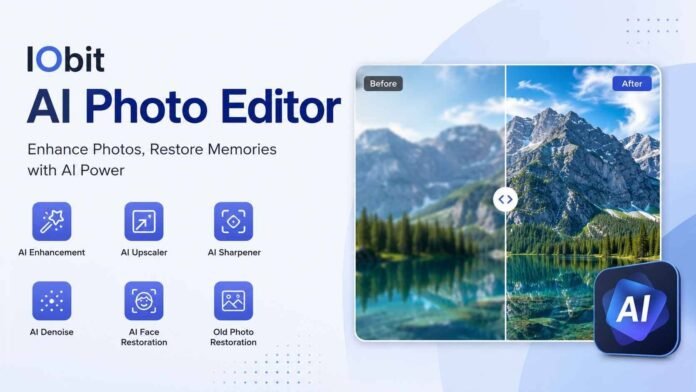
Artificial intelligence has made image enhancement much simpler by automating complex editing tasks. Instead of spending hours learning professional editing software, users can improve their photos with just a few clicks. One solution designed for this purpose is the AI Photo Editor from IObit, which focuses on enhancing image quality through AI-powered technology.
We’ll explore what the software offers, its key features, practical applications, and why AI-powered photo enhancement has become an essential tool for modern users.
What Is IObit AI Photo Editor?
The AI Photo Editor by IObit is an image enhancement tool that uses artificial intelligence to improve photo quality automatically. Rather than requiring manual editing skills, the software analyzes each image and applies intelligent enhancements based on its condition.
Whether the goal is restoring an old photograph, improving a blurry image, or increasing resolution, the software is designed to simplify the editing process while maintaining natural-looking results.
Key Features of IObit AI Photo Editor
AI Image Enhancement
One of the core capabilities of the software is automatic image enhancement. The AI examines lighting, clarity, textures, and overall image quality before applying suitable improvements.
This allows users to enhance photos without manually adjusting multiple editing settings.
AI Image Upscaler
Low-resolution images often appear pixelated when viewed on larger screens or printed. IObit’s AI-powered image upscaling technology enlarges images while preserving important details, helping photos look sharper and clearer.
This feature is useful for improving older digital images or preparing photos for high-resolution displays.
AI Image Sharpener
Blurry photos can occur because of camera movement, poor focus, or low-quality image sources. The AI Image Sharpener improves edge definition and restores fine details, making images appear clearer without excessive sharpening.
AI Denoise
Photos captured in low-light conditions often contain visible digital noise. The AI Denoise feature reduces grain while preserving textures, producing cleaner and more natural-looking images.
This is especially useful for night photography and indoor images.
AI Face Restoration
Portrait photos often lose facial details due to aging, compression, or low resolution. AI Face Restoration enhances facial clarity and restores natural details, making portraits appear sharper while maintaining a realistic look.
Old Photo Restoration
Old family photographs may fade, lose clarity, or develop imperfections over time. IObit AI Photo Editor helps restore these memories by improving image quality and enhancing important visual details.
This feature is valuable for preserving historical photographs and treasured family albums.
Why Choose IObit AI Photo Editor?
Several aspects make IObit AI Photo Editor suitable for everyday users.
Easy to Use
The software is designed with simplicity in mind. Users do not need professional editing experience to improve their photos. The AI performs most enhancements automatically, making the editing process accessible to beginners.
Fast AI Processing
Instead of manually correcting every image, users can rely on AI-powered automation to achieve quality improvements quickly.
Natural-Looking Results
Rather than producing over-processed images, the software focuses on maintaining realistic colors, textures, and facial details after enhancement.
Practical Uses of IObit AI Photo Editor
The software can be useful in many everyday situations.
Restore Family Memories
Old photographs can be enhanced to recover lost details and improve overall clarity before digital storage or printing.
Improve Portrait Photos
Portrait images affected by blur or low resolution can be enhanced using AI sharpening and face restoration technology.
Enhance Social Media Images
Clear, high-quality photos generally perform better across social media platforms. AI enhancement helps users prepare more attractive images without spending significant editing time.
Upgrade Older Digital Photos
Images captured years ago with older cameras or smartphones often have limited resolution. AI upscaling helps improve their appearance for modern displays.
Prepare Images for Printing
Increasing image quality before printing can produce sharper results for albums, posters, or framed photographs.
Benefits of AI-Powered Photo Enhancement
Using AI for image enhancement offers several advantages.
- Reduces manual editing time
- Improves image clarity automatically
- Restores older photographs
- Enhances portrait quality
- Reduces digital noise
- Increases image resolution
- Beginner-friendly workflow
- Consistent editing results
These benefits make AI photo enhancement suitable for both personal and professional use.
Final Thoughts
Artificial intelligence has transformed photo editing by making advanced image enhancement accessible to everyone. Instead of spending hours adjusting settings manually, users can improve image quality with intelligent automation.
The AI Photo Editor from IObit focuses on practical enhancement features such as AI Image Enhancement, AI Image Upscaler, AI Image Sharpener, AI Denoise, AI Face Restoration, and Old Photo Restoration. These capabilities help users restore aging photos, improve blurry images, enhance portraits, and prepare images for sharing or printing with minimal effort.
FAQs
1. What is IObit AI Photo Editor used for?
IObit AI Photo Editor is designed to improve image quality using artificial intelligence. It can enhance photo clarity, upscale low-resolution images, sharpen blurry pictures, reduce noise, restore facial details, and improve old photographs with minimal manual effort.
2. Can IObit AI Photo Editor restore old photos?
Yes. The software includes AI-powered restoration features that help improve the quality of old or faded photos by enhancing clarity and recovering visible details, making treasured memories look clearer.
3. Does IObit AI Photo Editor work for blurry images?
Yes. Its AI Image Sharpener analyzes blurry photos and enhances edge definition and fine details, helping images appear clearer while maintaining a natural look.
4. Is IObit AI Photo Editor suitable for beginners?
Absolutely. The software is designed with an easy-to-use interface and AI-powered automation, allowing users to enhance photos without requiring professional photo editing skills.
5. What types of photos can I improve with IObit AI Photo Editor?
You can use IObit AI Photo Editor to enhance portraits, old family photos, low-resolution images, blurry pictures, and photos affected by digital noise, making them suitable for sharing online or printing.